An appointment booking form template lets clients request a time with you in one go, without the endless back-and-forth.
No more “Are you free Tuesday?” calls, DMs you forget to answer, or two clients booked into the same slot. This guide gives you the fields every booking form needs, a 5-field short form, and 10 free templates by industry. Copy one, adjust it, and you can take bookings in minutes.
What is an appointment booking form?
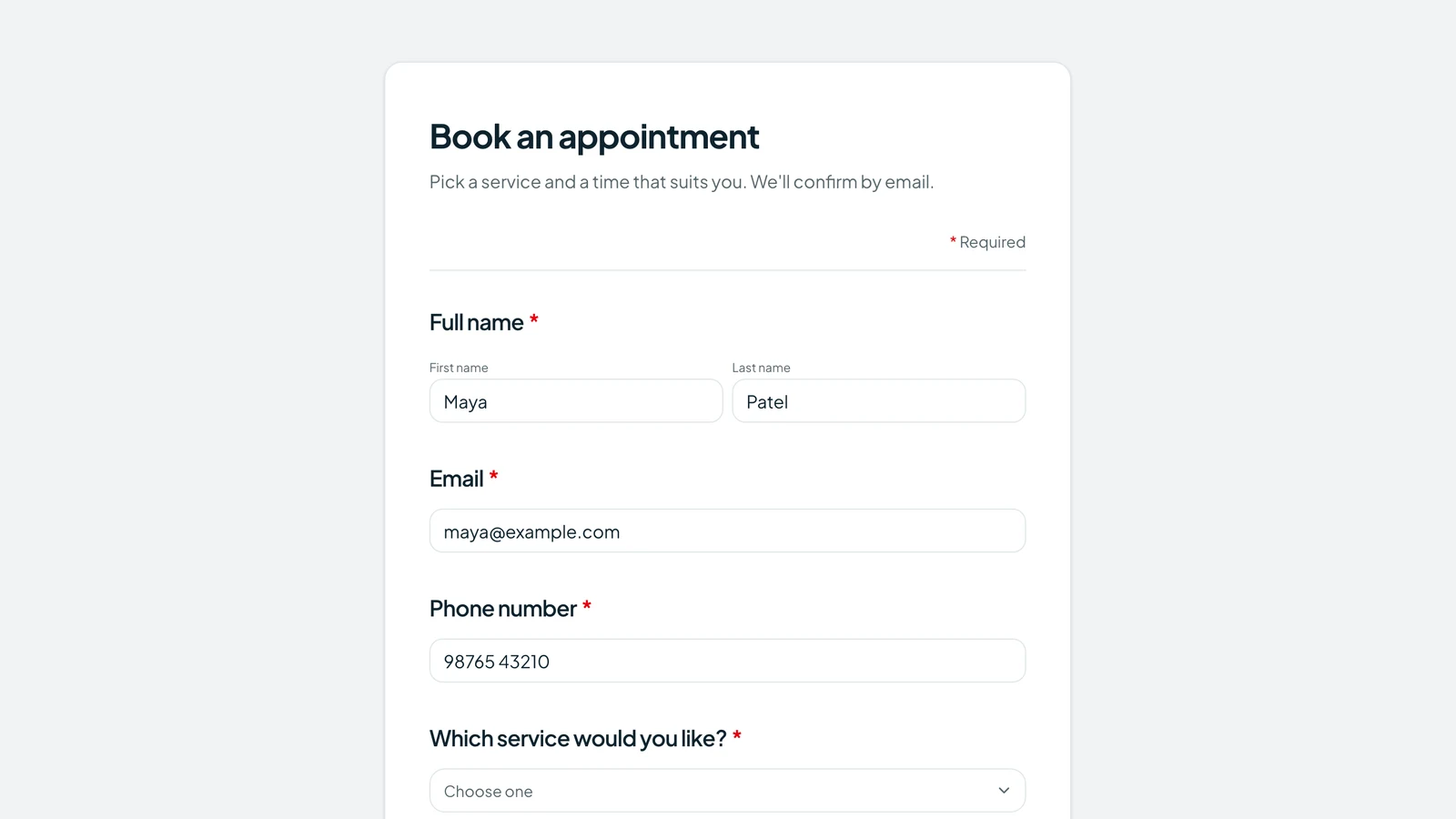
An appointment booking form is an online form that clients fill in to request or schedule a visit. It collects their contact details, the service they want and their preferred date and time, so you can confirm the booking without phone calls or long message threads.
Some booking forms only take requests that you confirm by hand. Others connect to a calendar so clients pick an open slot themselves. You will see both options below.
Essential fields for an appointment booking form
Start with these appointment form fields, then remove anything your business doesn't need. Every extra question is one more reason to leave.
| Field | Why it matters | Required? |
|---|---|---|
| Full name | Lets you greet and identify the client. | Required |
| For the confirmation and any changes. | Required (or phone) | |
| Phone | Fastest way to reach someone who is running late. | Required (or email) |
| Service type | Tells you how long to block and who should take it. | Required |
| Preferred date | The day they want to come in. | Required |
| Preferred time slot | Morning, afternoon or evening is often enough. | Required |
| Alternate time | Saves a round of messages when the first choice is taken. | Optional |
| Staff or provider preference | For businesses where clients have a favorite. | Optional |
| Location (in person or online) | Decides whether you send an address or a video link. | Required if you offer both |
| Notes or reason for visit | Helps you prepare and spot the wrong service. | Optional |
| New or returning client | New clients may need extra time or paperwork. | Optional |
| Cancellation policy checkbox | Sets clear expectations before the visit. | Required |
| Reminder preference | Email, SMS or WhatsApp: reach them where they read. | Optional |
All of these are ready in Tapzy's Appointment booking template, except the alternate time, staff and reminder questions, which take a minute to add.

Appointment short form template (5 fields only)
An appointment short form asks only what you need to confirm a booking. It works best when:
- Most visitors are on mobile, for example from Instagram or WhatsApp.
- Clients are returning and you already have their details.
- The session is a quick consult, like a 15-minute discovery call.
Here are the exact five fields:
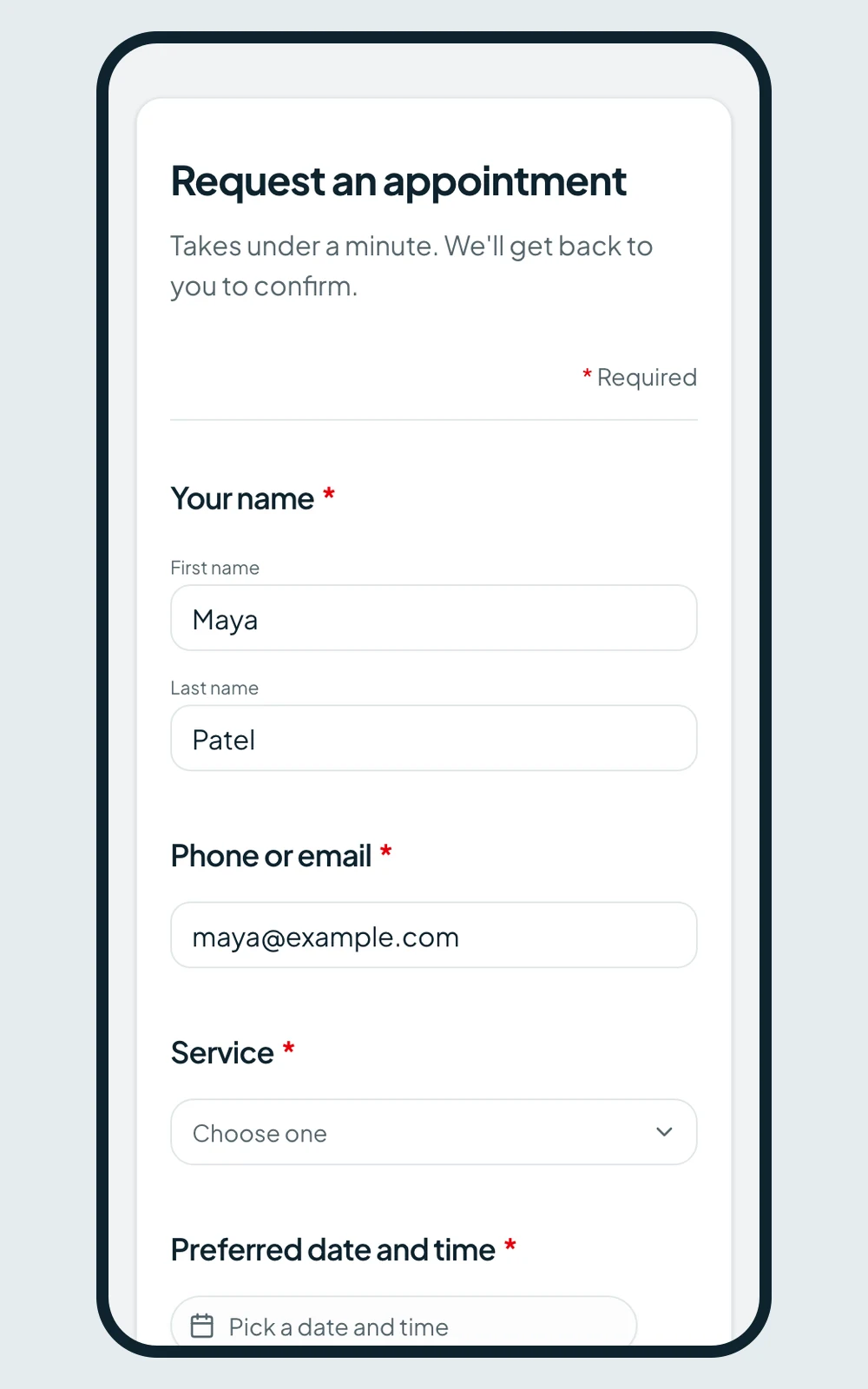
- 1.Your nameName
- 2.Phone or emailShort text
- 3.ServiceDropdown
- 4.Preferred date and timeDate & time
- 5.NotesLong text (optional)
You can collect everything else (address, history, preferences) after you confirm the time.
10 appointment booking form templates by industry
Each template below adds industry fields on top of the essentials (name, email, phone, service, date and time). Copy the questions, or build the form in Tapzy from the Appointment booking template.
Salon and spa appointment form
Who it's for: Hair salons, nail studios, barbers, beauty therapists and day spas.
- 1.Which stylist or therapist would you like?Dropdown
- 2.Treatment lengthMultiple choice
- 3.Do you have any allergies or skin sensitivities?Long text
- 4.Upload a photo of the look you wantFile upload
- 5.Is this booking for more than one person?Yes / No
Doctor and clinic appointment form
Who it's for: GP practices, specialist clinics and walk-in health centers.
- 1.Date of birthDate
- 2.Reason for your visitLong text
- 3.Do you have health insurance?Yes / No
- 4.Insurance provider and member numberShort text (shown if Yes)
- 5.Is this urgent?Yes / No
Dental appointment form
Who it's for: Dental practices, orthodontists and hygienists.
- 1.Type of visitMultiple choice (check-up, cleaning, pain, cosmetic)
- 2.Are you in pain right now?Yes / No
- 3.Date of your last dental visitDate
- 4.Are you nervous about dental treatment?Yes / No
- 5.Do you have dental insurance?Yes / No
Therapist and counseling intake form
Who it's for: Therapists, counselors, psychologists and coaches who handle sensitive topics.
- 1.What would you like support with?Checkboxes
- 2.Have you had therapy before?Yes / No
- 3.Session formatMultiple choice (in person, video, phone)
- 4.Is it safe to leave you a voicemail or text?Yes / No
- 5.How did you hear about us?Dropdown
Fitness and personal trainer booking form
Who it's for: Personal trainers, yoga and pilates studios, gyms and sports coaches.
- 1.What is your main goal?Multiple choice
- 2.Current fitness levelRating (1–5)
- 3.Any injuries or health conditions we should know about?Long text
- 4.Preferred training daysCheckboxes
- 5.Session typeMultiple choice (1:1, small group, online)
Consultant and coaching call form
Who it's for: Business consultants, coaches, agencies and freelancers.
- 1.Company or websiteURL
- 2.What do you want help with?Long text
- 3.Budget rangeMultiple choice
- 4.When do you want to start?Multiple choice
- 5.Pick a time for the callScheduler (Calendly, Cal.com, SavvyCal or TidyCal)
Real estate property viewing form
Who it's for: Estate agents, letting agents and property managers.
- 1.Which property would you like to view?Dropdown or hidden field
- 2.Are you looking to buy or rent?Multiple choice
- 3.Do you have a mortgage agreement in principle?Yes / No (shown for buyers)
- 4.When would you like to move?Multiple choice
- 5.How many people will attend the viewing?Number
Auto repair and car service form
Who it's for: Garages, mechanics, car washes and detailing services.
- 1.Vehicle make and modelShort text
- 2.YearNumber
- 3.Registration or license plateShort text
- 4.What service do you need?Checkboxes (service, MOT/inspection, repair, tyres)
- 5.Describe the problemLong text
- 6.Do you need a courtesy car?Yes / No
Tutoring and education booking form
Who it's for: Private tutors, music teachers, language schools and test-prep centers.
- 1.Student's name (if different from yours)Short text
- 2.SubjectDropdown
- 3.Grade or levelDropdown
- 4.Lesson formatMultiple choice (in person, online)
- 5.What would you like to focus on?Long text
Legal consultation request form
Who it's for: Law firms, solo lawyers, notaries and immigration advisors.
- 1.Area of lawDropdown
- 2.Brief description of your situationLong text
- 3.Names of other people or companies involvedLong text
- 4.Is there a deadline or court date?Date
- 5.Preferred consultation typeMultiple choice (in person, video, phone)
How to create an appointment booking form in Tapzy
Step 1: Pick a template
Start your Tapzy trial, go to Forms and click Create form. Choose Appointment booking or Appointment request (short) from the gallery.
Step 2: Edit the fields
Rename the services, change the time slots and add any industry questions from the templates above. Use the Date, Time or Date & time fields for scheduling questions.
Step 3: Add conditional logic
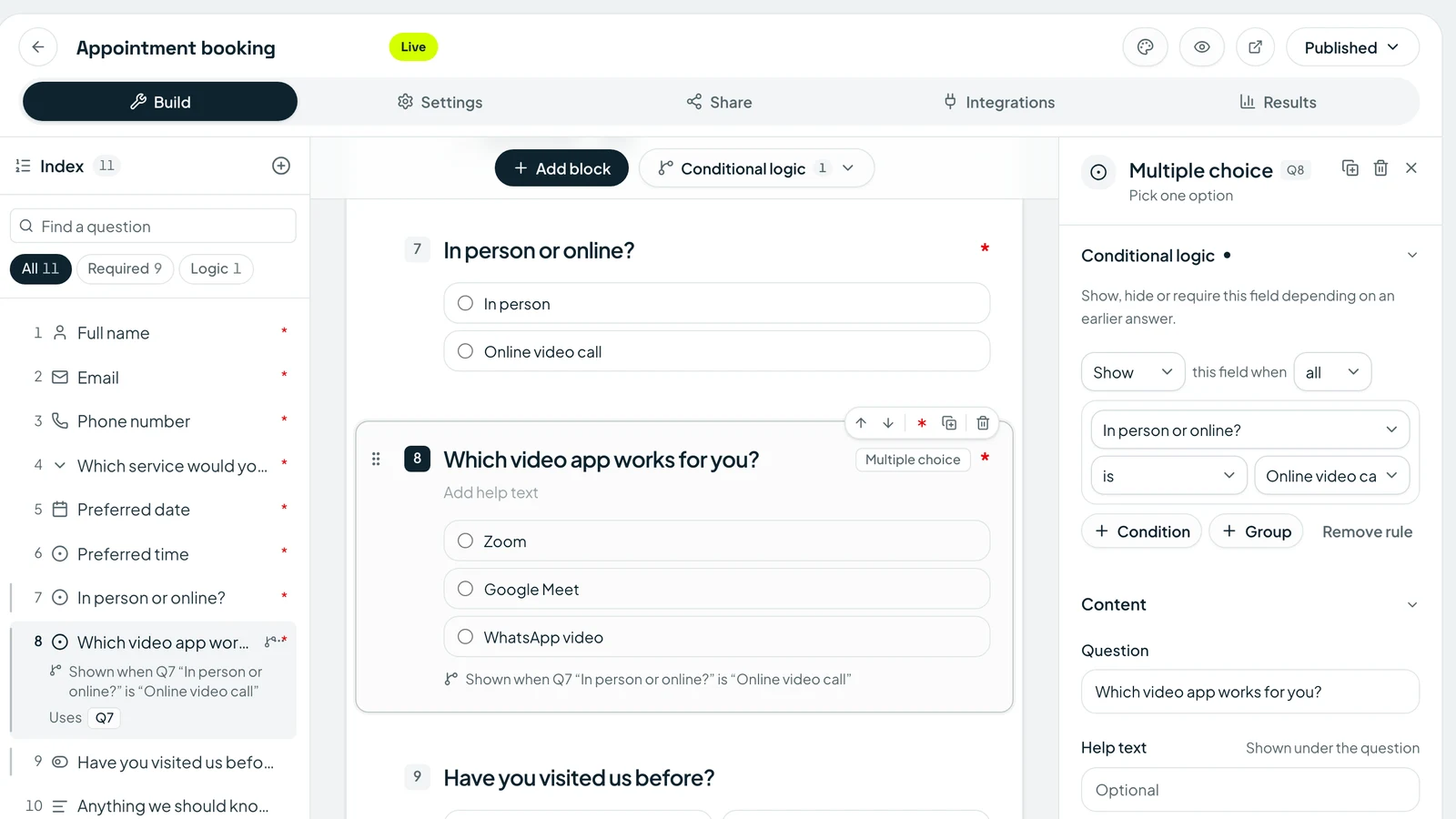
The template already shows “Which video app works for you?” only when someone picks Online video call. Add your own rules the same way, for example showing insurance questions only to people who say they have insurance.
Step 4: Set up notifications and the confirmation message
Turn on email notifications so you hear about every new booking, and send clients a confirmation email with a copy of their answers. Edit the thank-you screen to say what happens next.
Step 5: Share it everywhere
- Copy the link into your Instagram bio, Google Business Profile and email signature.
- Embed the form on your website's booking page.
- Print the QR code for your front desk, flyers or shop window.
- Make a tap-to-chat link with the free WhatsApp link generator for clients who prefer to message first.

Step 6: Collect and manage bookings
Every request appears in Responses. Sync bookings to Google Sheets, HubSpot or Notion, or send them anywhere with a webhook.
Your 15-day Tapzy trial needs no credit card and includes conditional logic, email notifications, embeds, QR codes and integrations. See plans on the pricing page.
Best practices to get more bookings and fewer no-shows
1. Keep it short
Ask only what you need to confirm the appointment. Collect the rest later.
2. Design for mobile first
Most booking links are opened on a phone. Use big tap targets, dropdowns for long lists and one column.
3. Show time slots clearly
Use plain ranges like “Morning (9am – 12pm)”. If you need live availability, add a Scheduler field that opens your Calendly, Cal.com, SavvyCal or TidyCal calendar.
4. Send an instant confirmation
A confirmation email with the booking details reassures clients and gives them something to find later.
5. Add reminders
Ask how clients want to be reminded. Tapzy doesn't send reminders on a schedule, so send them yourself or let your connected calendar tool handle them.
6. Include the cancellation policy
A required checkbox makes the policy hard to miss. For high-value sessions, a small deposit through a Payment field (Stripe or Dodo Payments) is even stronger.
7. Put the booking link everywhere
Your bio, website header, email signature, Google profile and receipts. The easier it is to find, the fewer bookings arrive by phone.
After the visit, ask how it went with one of these feedback form samples.
Appointment booking form vs scheduling software
| Booking form | Scheduling software | |
|---|---|---|
| Cost | Often included in a form tool you already use | Usually a separate monthly subscription |
| Setup time | Minutes with a template | Longer: calendars, availability rules, staff |
| Flexibility | Ask any question, add logic, payments and file uploads | Fixed booking flow with limited custom questions |
| Live availability | No, you confirm by hand (unless you add a calendar) | Yes, clients see open slots |
| Best for | Request-based bookings, intake details, low to medium volume | High volume, many staff, automatic reminders |
Be honest about your volume. If you take dozens of bookings a day across several staff members, a dedicated calendar tool will save time. Many businesses use both: a Tapzy form to qualify and collect details, with a Scheduler field to pick the slot.
A good appointment booking form template saves you hours of messages and gives every client a clear way to book. Start with the essential fields, use the short form for mobile and repeat clients, and add the industry questions that fit your business. Start taking bookings today: use a free appointment form template, no credit card needed.